
Skip to content

Pixel art

Online pixel art editor for game sprites

Draw sprites, tiles and icons on a crisp pixel canvas, animate them frame by frame, and export sprite sheets your engine reads without extra work.

Free in your browser, with no watermark and nothing to install.

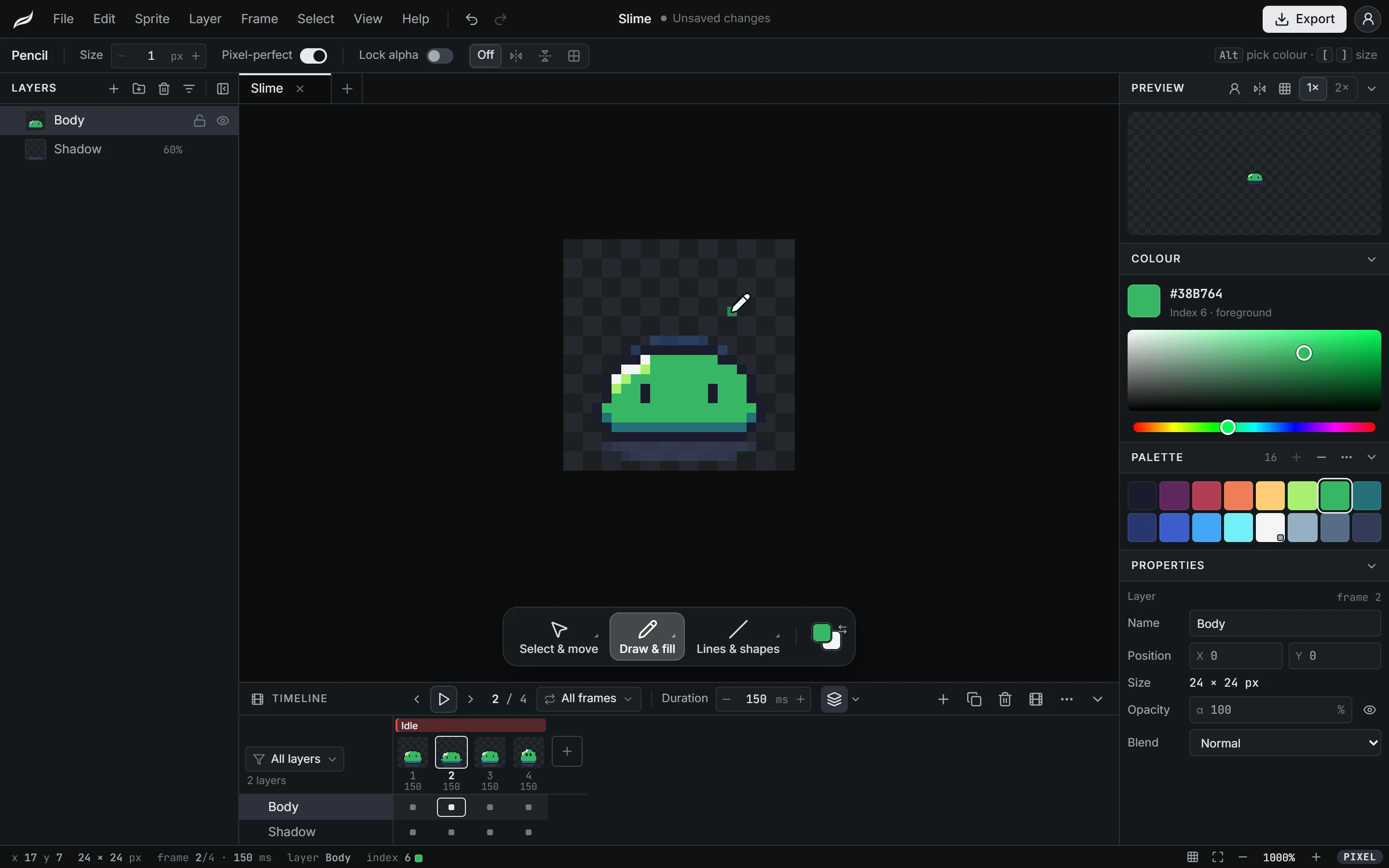
The Moriqa editor with a 24 × 24 slime sprite: layers on the left, four frames tagged Idle in the timeline, palette and properties on the right.
  • Frame animation
  • Onion skin
  • Palettes and ramps
  • Godot, Unity and GameMaker export

In detail

How Moriqa fits your workflow

Draw on real pixels

A sprite is a fixed-size canvas of whole pixels: nothing is smoothed, zooming keeps pixels square, and every tool lands on the grid.

The pencil has a pixel-perfect mode that cleans up the doubled corners of freehand lines, and lines, rectangles, ellipses and fills are drawn pixel by pixel, never anti-aliased.

  • Pencil, eraser, line, rectangle, ellipse and fill
  • Symmetry on one or both axes, with axes you can move
  • Lock alpha to recolour only what is already drawn
  • Marquee, lasso and magic wand selections

Animate frame by frame

A timeline made for sprites

Add, duplicate and reorder frames, give each its own duration, and tag loops such as Idle or Walk so they play and export as separate animations. The timeline lists the layers that move, and more when you ask for them.

Onion skin and live playback

See neighbouring frames in red and blue while you draw, up to five either side, optionally only within the current tag. Keep drawing while the animation plays; each stroke lands on the frame on screen.

Colours that stay consistent

Start from a classic palette such as PICO-8, Sweetie 16, Endesga 32 or Game Boy, or none. Build a ramp between two colours, add hue-shifted shades, pull the colours out of your sprite, and replace one colour with another on every frame at once.

Tiles, references and imports

Turn on a tile grid at any tile size and check seams in a 3 × 3 tiled preview. Put a reference image under your drawing without it ever reaching an export. Open a PNG as a new sprite, or import a sprite sheet and have it cut into frames.

Export that drops into your engine

Export a sprite sheet laid out as a row, a column or a grid, with padding, trimming and power-of-two sizes, and the file your engine reads beside it: a SpriteFrames resource for Godot 4, a sliced sprite .meta for Unity, a named strip for GameMaker, or Aseprite-style JSON for everything else. GIFs, single PNGs and PNG frames are there too, at 1× to 8×.

Pixel Art Editor

Frequently asked questions

Is the pixel art editor free?

Yes, completely, with every export format and no watermark. There is no paid plan.

Can I animate sprites?

Yes. Sprites have frames with their own durations, tags for loops, onion skin, and playback you can keep drawing into.

Which engines does the export support?

Godot 4 (SpriteFrames .tres), Unity (a sliced Multiple sprite .meta), GameMaker (strip naming), and any engine that reads Aseprite-style JSON, such as Phaser.

How big can a sprite be?

Up to 1024 × 1024 pixels, with as many layers and frames as a sprite usually needs. A project can hold several sprites side by side.

Is it an Aseprite alternative?

For drawing and animating sprites in the browser, yes: layers, frames, tags, onion skin, palettes and engine exports are all here. Aseprite remains a mature desktop app with features Moriqa does not have yet, such as opening .aseprite files.

Draw your first sprite

The editor opens in your browser with a new sprite ready.