
Skip to content

Photo editing

Free online photo editor with layers

Open a photo, crop it, correct its light and colour, retouch it, add text or another picture, and export it. The everyday part of Photoshop, in a browser tab.

Free, with no watermark and nothing to install. Photos are edited on your own computer.

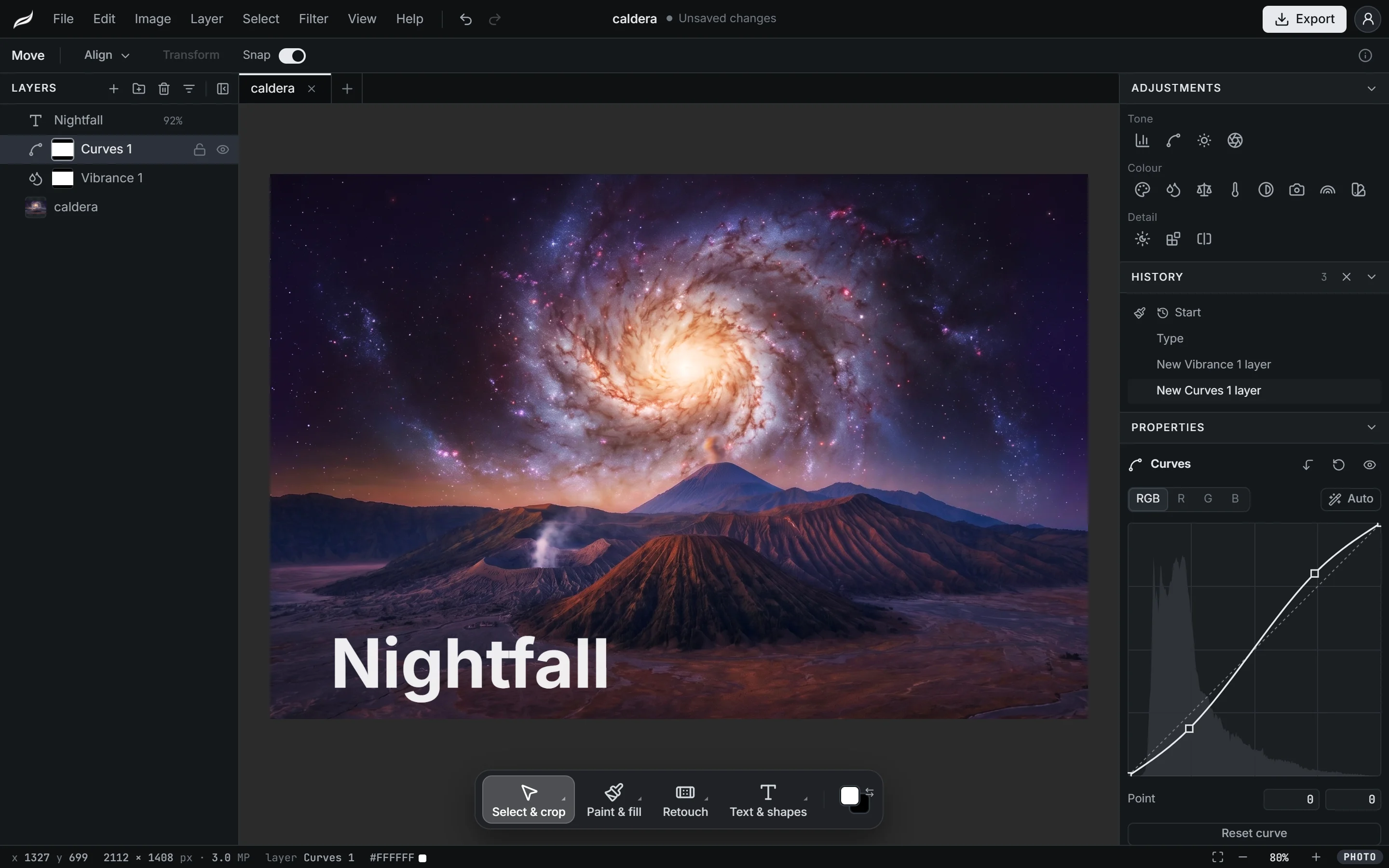
The Moriqa photo editor with a night landscape open: a text layer and Curves and Vibrance adjustment layers on the left, the curve and the history on the right, the tools along the bottom.
  • Layers and masks
  • Adjustment layers
  • Healing and clone tools
  • Opens and saves PSD

In detail

How Moriqa fits your workflow

Fix a photo

Crop to a ratio and straighten the horizon, resize the image or its canvas, rotate and flip. Then correct light and colour with adjustment layers, which sit above the photo and can be changed or switched off at any time.

  • Levels and Curves with a histogram, Brightness/Contrast and Exposure
  • Hue/Saturation, Vibrance, Colour balance, White balance, Black & white, Photo filter, Gradient map and Selective colour
  • Filters: Gaussian, motion and surface blur, unsharp mask, noise, mosaic, high pass and vignette
  • A History panel that names every step and goes back to any of them

Retouch

Take out what does not belong and repair what does. The clone and healing tools paint onto their own layer by default, so the original photo stays untouched underneath.

  • Spot healing brush, healing brush and patch tool
  • Clone stamp with a source you set by Alt-click
  • Content-aware fill for a selected area
  • Dodge, burn and sponge; blur, sharpen and smudge
  • Liquify, to push, bloat and pucker

Select and cut out

Select with the marquee, the lasso or the polygonal lasso, paint a selection with the quick selection brush, or click with the magic wand. Select and mask refines hair and soft edges, and the result becomes a layer mask, so nothing is erased.

Select subject and Remove background find the main subject for you and turn it into a selection or a mask you can keep refining.

Compose and design

Build a picture from layers and groups with 27 blend modes, clipping masks and layer styles such as drop shadow, stroke and glow. Free transform scales, turns, skews, distorts in perspective and warps a layer, and a placed image stays sharp however often it is resized.

  • Text you can edit later, set along a path or warped
  • Shapes, a pen tool and paths
  • Align and distribute, smart guides, rulers and guides

PSD files and export

Open a PSD with its layers, groups, masks, clipping, blend modes, adjustment layers and layer styles; text stays editable when its font is available. Save a copy as PSD to hand the work back to someone who uses Photoshop.

Export as JPG, PNG or WebP, at the quality and size you choose, with the file size shown before you save. Unsaved work is kept in the browser and offered back if the tab closes.

Made with game art in mind

Make a texture seamless so it tiles with no visible join, resize it to a power of two, pull a palette out of a picture, or turn a photo into pixel art and carry on in the pixel art editor.

Photo Editor

Frequently asked questions

Is the photo editor free?

Yes. Every tool and every export format is free, and nothing is watermarked. There is no paid plan.

Do I need an account?

Yes, a free one. Sign in with Google, GitHub, Discord or email and the editor opens. Your photos and projects stay on your computer.

Can it open Photoshop files?

Yes. A PSD opens with its pixel layers, groups, masks, clipping, blend modes, adjustment layers and layer styles. Text stays editable when its font is one Moriqa has; anything Moriqa does not know is kept as pixels and listed in a notice. You can save a copy as PSD too.

Is it a Photoshop alternative?

For everyday jobs, yes: cropping, colour correction, retouching, cutouts, composites, thumbnails and banners, with the shortcuts Photoshop users know. It does not cover print work (CMYK, 16-bit), camera RAW files, actions, 3D or video.

Are my photos uploaded?

No. Photos are opened, edited and saved on your computer. Two commands, Select subject and Remove background, send the picture to Moriqa’s background removal service to find the subject, and they say so before the first use.

How large can a photo be?

Up to 30,000 pixels a side and 250 megapixels. The editor is built for large files: it is tested with 24-megapixel photos and twenty layers on a laptop with integrated graphics.

Does it work on a phone or tablet?

The editor is built for desktop and laptop browsers, with a mouse or a pen tablet (pen pressure is supported). The free tools on moriqa.com work on phones too.

Open a photo and start editing

The photo editor opens in your browser. Drop in a photo, or start from a blank image.